To search
Softonic Rating:
Excellent910
License:
Free
Added:
September 19, 2007
Updated:
April 21, 2008
Publisher:
Website
File size:
1.6 MB
Downloads:
3,974
James Thornton

“Easy-to-use tool to edit metadata of common audio formats”

by James Thornton

Most of us who own an MP3 player or play digital music on a computer will admit that it’s possible to get a little precious over your audio collection. There’s something very satisfying about having a hoard of music with the correct track and album names for each song. Not only does it look a lot cleaner in your player, but it makes it a darn sight easier to organize your collection and manage playlists. Ensuring that all the tags in your audio files are correct can be a thankless task, but there’s plenty of software around that will make a much quicker job of it.

mp3Tag is one of the better tag editors around, allowing you to edit the metadata (the information about a track’s name, size, album name, artwork, etc.) with a good degree of autonomy. The app lets you rename files based on this tag information, replace characters or words from tags and filenames, import/export tag information, and create playlists. It carries out its dutiesdoes the job very well too. For instance, the program has a much cleaner interface than many of its rivals and is smaller to boot, making it very quick and responsive.

If you find that you have a lot of different audio formats on your machine that you want to keep in check then mp3Tag is perfect. It supports virtually every major audio file type, so you can edit tags for Ogg, Musepack, and AAC/MP4, besides just MP3s. tThe program isn't just a tagger, as it also includes cutting and joining functions that perform pretty well.

Perhaps the biggest boon though is the inclusion of a link-up with the online FreeDB database to import tags from the appropriate album, spelling a swift end to those MP3 albums you get with track names like ‘track01’, ‘track02’, ‘track03’, etc.) While the data returned from the FreeDB is sometimes erroneous, it’s generally pretty good (though probably not quite as quick as the import tool in Tag&Rename).

It’s fair to say that mp3Tag is one of the clear leaders in its field, and considering it’s a freeware app, it’s well worth downloading if you want to clean- up your music collection. Tag editing is very quick and once you’ve given your audio the mp3Tag treatment, you should find it so much easier to organize your tracks.

Languages:

English

Recent changes in mp3Tag:

  • This version comes with full support for iTunes Podcast Tags, improved usability and accessiblity and many other new features, changes and bugfixes.

OS requirements for mp3Tag:

  • OS: Win95/98/98SE/Me/2000/NT/XP/Vista
Pros
  • Very quick and lightweight application
  • Powerful FreeDB track look-up
  • Built-in cutting and joining tools
Cons
  • Album look-up is sometimes inaccurate
  • A few small bugs reported by users
Did you like this review?
17 of 20 users liked it (85%)

Featured program

Softonic gives special recognition to software of exceptionally high quality. More information

From the publisher of mp3Tag

mp3tag is a powerful and yet easy-to-use tool to edit metadata (ID3, Vorbis Comments and APE) of MP3, WMA, OGG, APE, AAC, MPP/MPC/MP+, MP4/M4a files. It can rename files based on the tag information, replace characters or words from tags and filenames, import/export tag information, create playlists and more. The program supports online freedb and Amazon database lookups for selected files, allowing you to automatically gather tag information for select files or CDs.

Another important advantage is the automatic tag filling option, which works great for MP3 albums that come without tags and meaningless file names, like 01.mp3, 02.mp3, 03.mp3, etc. The program takes the track lengths and compares this information with FreeDB data to find the appropriate album to import tags from. After confirmation the information is stored in the tags and if required can be used to rename the files.

mp3Tag allows the users to view and edit tag information, save lyrics and pictures inside MP3, M4a or WMA-files, view technical information about music files and delete unused MP3-tags. The program is capable of changing one or more tag fields simultaneously (including multiple files), generating WinAmp and Windows Media Player playlists, exporting tag information, renaming groups of files according to their tag data and much more. And special feature for iPod lovers – m4a tag editor!

Other important program features are the Drag&Drop technology and is fully compatible with Windows Media Player 10 and iTunes 6. It does not require any special skills and has received over a dozen awards, including prestigious WebAttack Editor's Pick. The program is translated into all major European languages.

Posts about mp3Tag in our blog

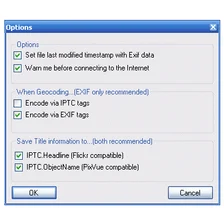
mp3Tag options

mp3Tag Options

Reviews for mp3Tag in other languages

  • Mp3tag (Testbericht auf Deutsch)
  • Mp3tag (Análisis en español)
  • mp3Tag (Le test en français)
Softonic Rating:Excellent
9/10

User Rating

30 ratings
Usability
  • Currently 9/10.
Stability
  • Currently 9/10.
Installation
  • Currently 9/10.
Functionality
  • Currently 9/10.
Appearance
  • Currently 9/10.

Download stats

Are you the developer of mp3Tag?

If your program has received a Softonic rating, feel free to use the following award badge on your site or as part of any other promotional feature you may be putting together.

mp3Tag Softonic Rating

Click on the above text field to copy the necessary HTML to your clipboard and then paste it to your website. It will display your program's Softonic Rating and will link to your program page.

Any queries? Contact us if you want more info.

Close